Rebate processing with Condition Contract in S/4HANA.
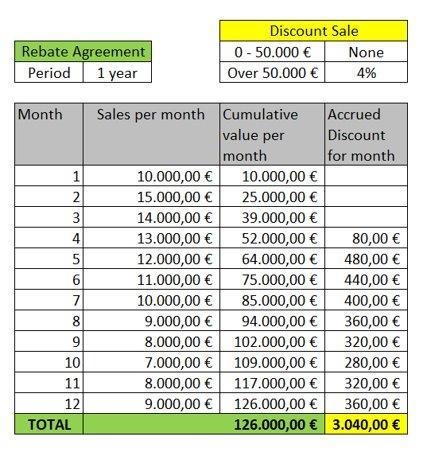
Rebate is a discount paid to a customer retroactively, based on sales volume over a period and settled by credit notes — with accruals calculated regularly. Here is how SAP S/4HANA rethinks the whole flow, step by step.
Sales Rebate processing in SAP ECC.
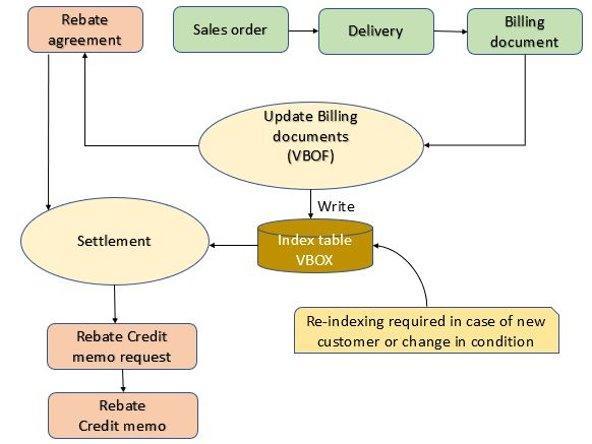
The process flow diagram for Sales Rebate in SAP ECC is depicted in the image below.
After the creation of a rebate agreement and the related billing documents,
transaction VBOF (or program SDBONT06) must be run to update the
corresponding sales volume inside the rebate agreement.
Rebate is generally processed at regular intervals or at the end of the year. An index table VBOX is used to link the rebate invoices and reduce processing time. Finally, the rebate agreement is released for settlement and the subsequent settlement creates a debit memo request and a debit memo to the customer.
Major limitations in ECC
- Size of index table VBOX can be very high (in the range of 2–5 TB), especially for consumer goods companies.
- Re-indexing of table VBOX is required whenever there are new customers or changes in rebate conditions.
- Only rebate-relevant customer sales documents can be processed.
Rebate in S/4HANA.
S/4HANA has simplified rebate processing with:
- Elimination of the index table — no more VBOX.
- In-memory HANA database with the capability to access and process the primary / billing documents directly.
- Elimination of the debit memo request.
- Harmonization of rebate processing for both "Order to cash" and "Procure to pay" scenarios.
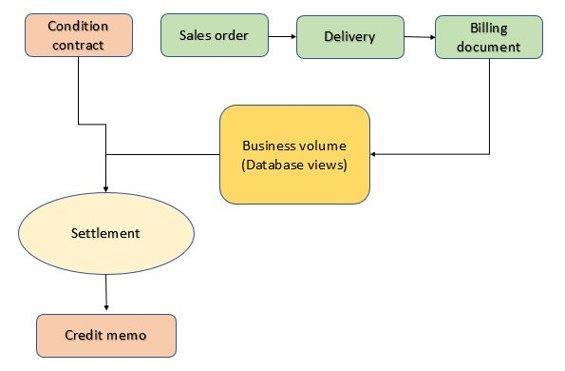
A Condition Contract is created in S/4HANA instead of a rebate agreement, as shown below. The system no longer needs to update the billing document in the rebate agreement (condition contract), nor does it require separate tables (like VBOX in ECC). The HANA database now accesses the relevant billing documents directly and calculates accrual values based on the accrual conditions of the business volume for the condition contracts.
Note also that no credit memo request is created — a further simplification. The settlement document directly creates the credit memo along with the corresponding financial accounting documents.
The simplified sales rebate flow with Condition Contract in S/4HANA is depicted in this image. Business volume is determined based on the parameters in the condition contract, and the relevant data is read directly from the corresponding business documents (like billing documents for sales rebate).
Example: Flat Tier Rebate with multiple customers, product hierarchy & material exclusion.
To create a Condition Contract for multiple customers, the code 0S02 Sales Rebate – Multiple Customers
must be selected after launching the WCOCO transaction.
Once inside the transaction, set the start and end date of the contract. In the Sales tab enter Sales Org., Distribution Channel and Division.
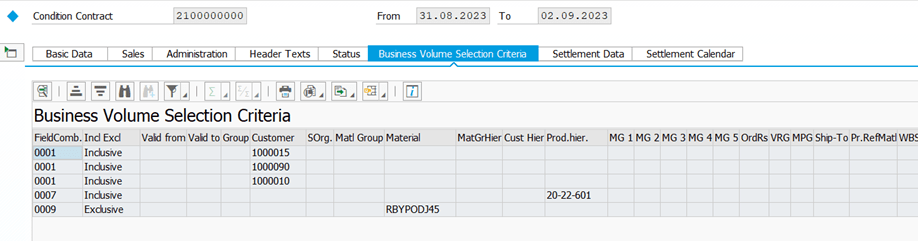
Business Volume settings
In this case, all customers for whom the contract is to be valid must be entered in the Business Volume section. In addition to customers, other criteria on which the condition contract is based — such as product hierarchy and materials to be excluded — can also be entered here.
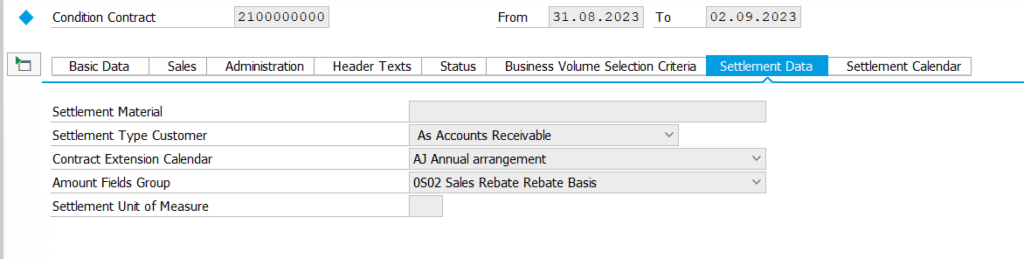
Settlement Data.
In this section you can set the basis for calculating the rebate.
In our example, the S02 Rebate Basis has been set.
From the Business Value report (WB2R_BUSVOL) you can see the basis
for calculating the rebate:

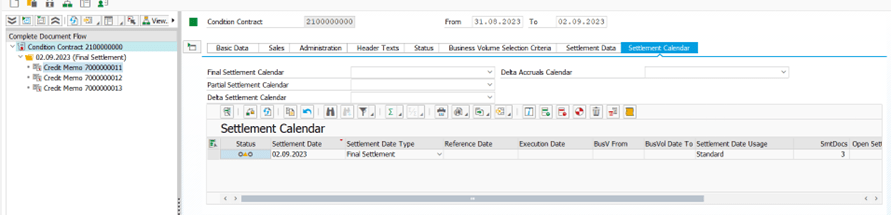
Settlement Calendar
From here it is possible to define the date of creation of the Settlement document, which can be partial or final.
As we can see from the printscreen below, since the date of execution of the Settlement is not present, the traffic light is yellow and the process has not been completed:
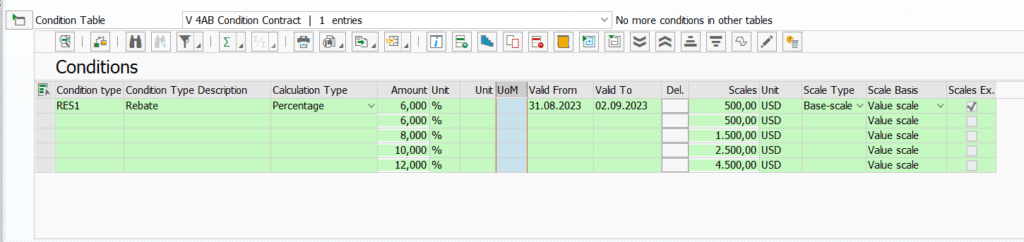
Condition Table.
In the Condition tables it is possible to define the contract rebate. In this case, a discount percentage has been defined for a certain value base, as shown in the printscreen below:
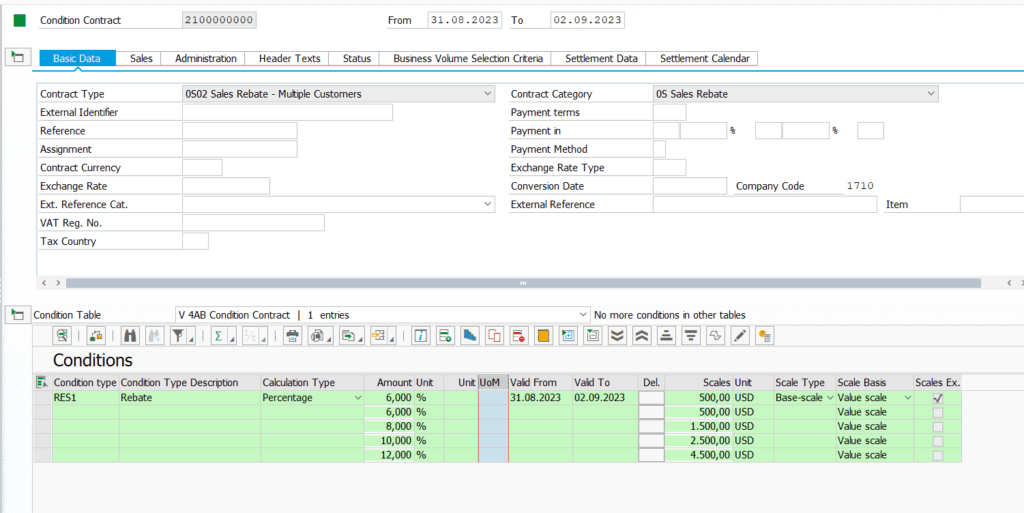
Once the condition contract has been created, it must be released to make it valid. Otherwise, if the condition contract is not released, documents will not be taken into account to calculate rebates.
Settlement Execution.
By launching the WB2R_SC transaction, we are creating Settlement documents.
In this specific case, three separate documents will be created — one for each
customer entered in the condition contract:
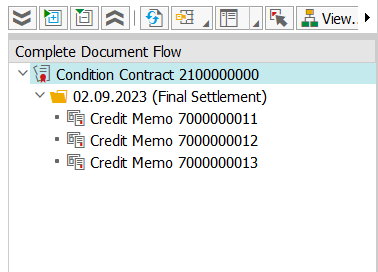
From transaction WB2R_BVDETAIL you will be able to see the details of each one:

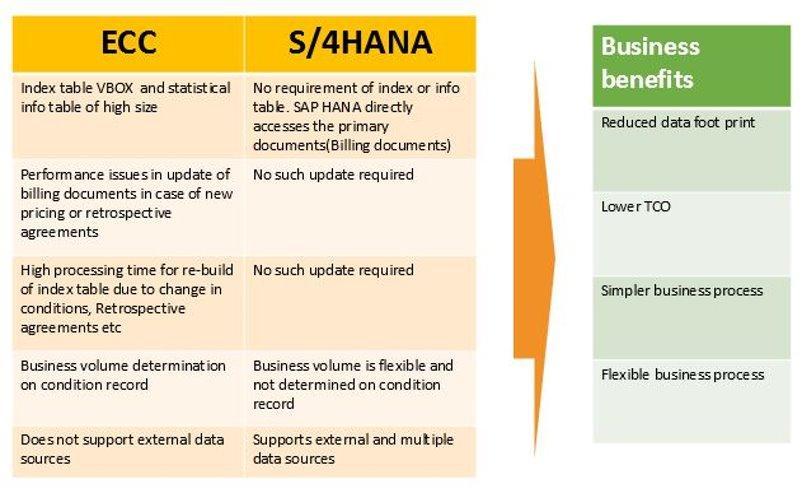
Business benefits.
The business benefits of the new Rebate solution with Condition Contract are captured and summarized below:
Ready to master CCM Rebates for real?
This article is the tip of the iceberg. Our CCM Rebates microlearning gives you the full picture — deferred, advance, promotional, customer contribution and vendor rebate scenarios — through short, focused video modules built on a real consumer goods project.
VAT IT 03866020799 · Share Capital € 50,000
Rebate processing with Condition Contract in S/4HANA.
Rebate is a discount paid to a customer retroactively, based on sales volume over a period and settled by credit notes — with accruals calculated regularly. Here is how SAP S/4HANA rethinks the whole flow, step by step.
Sales Rebate processing in SAP ECC.
The process flow diagram for Sales Rebate in SAP ECC is depicted in the image below.
After the creation of a rebate agreement and the related billing documents,
transaction VBOF (or program SDBONT06) must be run to update the
corresponding sales volume inside the rebate agreement.
Rebate is generally processed at regular intervals or at the end of the year. An index table VBOX is used to link the rebate invoices and reduce processing time. Finally, the rebate agreement is released for settlement and the subsequent settlement creates a debit memo request and a debit memo to the customer.
Major limitations in ECC
- Size of index table VBOX can be very high (in the range of 2–5 TB), especially for consumer goods companies.
- Re-indexing of table VBOX is required whenever there are new customers or changes in rebate conditions.
- Only rebate-relevant customer sales documents can be processed.
Rebate in S/4HANA.
S/4HANA has simplified rebate processing with:
- Elimination of the index table — no more VBOX.
- In-memory HANA database with the capability to access and process the primary / billing documents directly.
- Elimination of the debit memo request.
- Harmonization of rebate processing for both "Order to cash" and "Procure to pay" scenarios.
A Condition Contract is created in S/4HANA instead of a rebate agreement, as shown below. The system no longer needs to update the billing document in the rebate agreement (condition contract), nor does it require separate tables (like VBOX in ECC). The HANA database now accesses the relevant billing documents directly and calculates accrual values based on the accrual conditions of the business volume for the condition contracts.
Note also that no credit memo request is created — a further simplification. The settlement document directly creates the credit memo along with the corresponding financial accounting documents.
The simplified sales rebate flow with Condition Contract in S/4HANA is depicted in this image. Business volume is determined based on the parameters in the condition contract, and the relevant data is read directly from the corresponding business documents (like billing documents for sales rebate).
Example: Flat Tier Rebate with multiple customers, product hierarchy & material exclusion.
To create a Condition Contract for multiple customers, the code 0S02 Sales Rebate – Multiple Customers
must be selected after launching the WCOCO transaction.
Once inside the transaction, set the start and end date of the contract. In the Sales tab enter Sales Org., Distribution Channel and Division.
Business Volume settings
In this case, all customers for whom the contract is to be valid must be entered in the Business Volume section. In addition to customers, other criteria on which the condition contract is based — such as product hierarchy and materials to be excluded — can also be entered here.
Settlement Data.
In this section you can set the basis for calculating the rebate.
In our example, the S02 Rebate Basis has been set.
From the Business Value report (WB2R_BUSVOL) you can see the basis
for calculating the rebate:
Settlement Calendar
From here it is possible to define the date of creation of the Settlement document, which can be partial or final.
As we can see from the printscreen below, since the date of execution of the Settlement is not present, the traffic light is yellow and the process has not been completed:
Condition Table.
In the Condition tables it is possible to define the contract rebate. In this case, a discount percentage has been defined for a certain value base, as shown in the printscreen below:
Once the condition contract has been created, it must be released to make it valid. Otherwise, if the condition contract is not released, documents will not be taken into account to calculate rebates.
Settlement Execution.
By launching the WB2R_SC transaction, we are creating Settlement documents.
In this specific case, three separate documents will be created — one for each
customer entered in the condition contract:
From transaction WB2R_BVDETAIL you will be able to see the details of each one:
Business benefits.
The business benefits of the new Rebate solution with Condition Contract are captured and summarized below:
Ready to master CCM Rebates for real?
This article is the tip of the iceberg. Our CCM Rebates microlearning gives you the full picture — deferred, advance, promotional, customer contribution and vendor rebate scenarios — through short, focused video modules built on a real consumer goods project.
VAT IT 03866020799 · Share Capital € 50,000